Getting your chair height right should make everything else easier. Your feet feel planted, your hips feel supported, your shoulders drop, and your neck stops doing extra work. If you have to constantly fidget, perch on the edge of the seat, or feel pressure under your thighs, the height is usually the first thing to fix.
A useful rule is this: proper office chair height is not a number. It is a relationship between your feet, your knees, your hips, and the height of the surface you work on.
Why a "standard chair height" still feels wrong
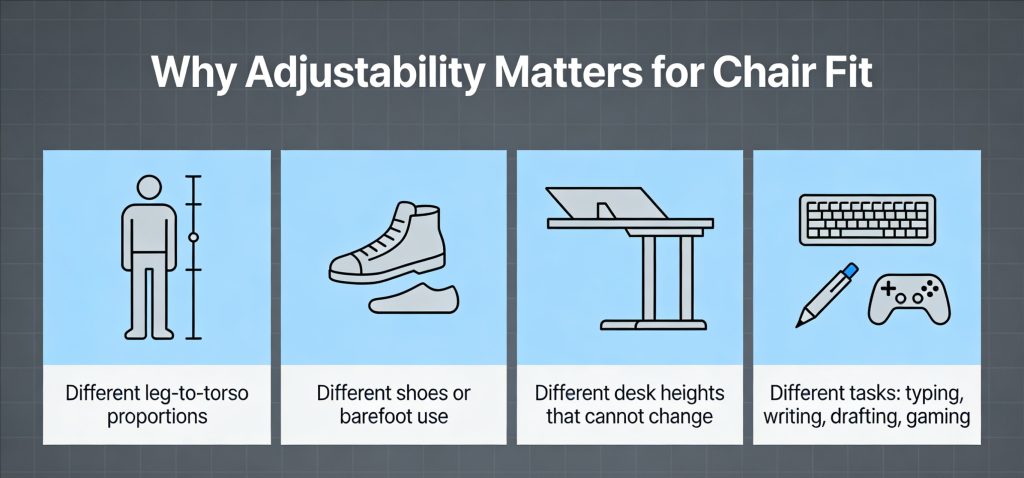
Most guides give you a range and call it done. The problem is that two people with the same height can need different setups because of:
- Different leg-to-torso proportions
- Different shoes or barefoot use
- Different desk heights that cannot change
- Different tasks, like typing all day vs writing, drafting, or gaming
There is also a common trap: feet flat on the floor is necessary, but not always sufficient. A setup can pass the “feet flat” test while still forcing your pelvis to tuck under, your shoulders to rise, or your wrists to bend.
That is why you want a clear way to judge the setup, not memorize one “correct” measurement. Understanding how chair height affects sitting posture helps explain why the same height can feel right for one person and wrong for another.
What proper office chair height really means
When the height is right, three things happen at the same time:
- Your feet are fully supported. The entire sole can rest on the floor or on a stable footrest.
- Your knees and hips are in a sustainable position. A common ergonomic target is knees around 90 degrees or a bit more open, and the seat not pressing into the back of your knees.
- Your upper body does not compensate. You are not shrugging to reach the keyboard, not hunching forward to see the screen, and not bending your wrists up to type.
A practical way to understand height is to separate two goals:
- Lower-body goal: chair height relative to the floor
- Upper-body goal: chair height relative to your desk and keyboard height
You solve the lower-body goal first, then adjust the workstation around it.
Chair height by your body height as a starting point
Use this as a starting point only. Your comfort and neutral posture matter more than the chart.
Typical seat-height range you should look for in a chair
Many office chairs are designed to adjust roughly 40 to 51 cm in seat height, which is about 16 to 20 inches, aligning with common office chair standards.
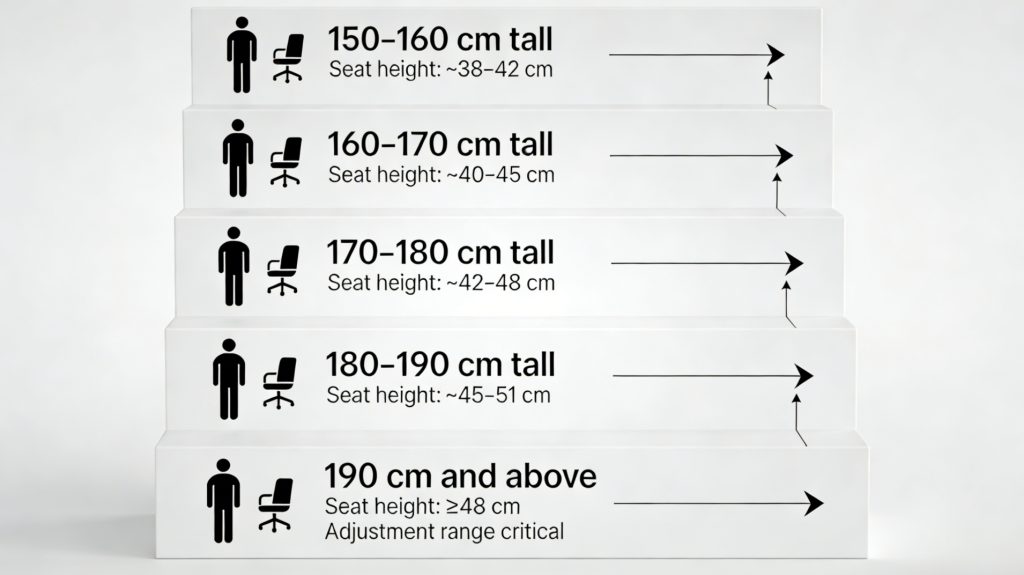
Starting points by user height
These are “get close fast” ranges. Fine-tune using the checklist later.
- 150 to 160 cm tall: seat height often lands around 38 to 42 cm
- 160 to 170 cm tall: seat height often lands around 40 to 45 cm
- 170 to 180 cm tall: seat height often lands around 42 to 48 cm
- 180 to 190 cm tall: seat height often lands around 45 to 51 cm
- 190 cm and above: you may need 48 cm and up, and chair range becomes critical
If your ideal height sits at the very top or bottom of the chair’s adjustment range, that chair is more likely to feel “almost right” but never stable.
Chair height and desk height and which one to adjust first
If your desk height can change
- Set chair height for your legs and feet first.
- Then raise or lower the desk so your forearms can work without shoulder tension.
If your desk height cannot change
- Set chair height for your legs and hips as close as possible.
- If the desk is too high, raise the chair until your arms can work comfortably, then use a footrest so your feet stay supported.
- If the desk is too low, avoid lowering the chair into a cramped position. Instead, bring the keyboard and mouse up using a keyboard tray or a stable platform, or raise the desk surface.
The key idea: you should not sacrifice lower-body support just to match a fixed desk height. If you do, the discomfort usually moves to your lower back and neck.
How to set your chair height step by step in the right order
Step 1: Start away from the desk
Roll back so you are not reaching for the keyboard. Sit all the way back in the seat.
Step 2: Set seat height relative to the floor
Adjust height until the entire sole of your foot can rest on the floor. This is a core ergonomic chair criterion.
If you are unsure where to begin, one simple method is to stand in front of the chair and adjust the seat so the highest point of the seat is just below your kneecap level, then sit and fine-tune.
Step 3: Check the space behind your knees
You want a small gap so the seat edge does not press into the back of your knees. If your chair has seat depth adjustment, use it.
Step 4: Set back support so you can relax
Adjust lumbar support and backrest so you can sit back without slumping. Chair height and back support work together. If you have to hover forward to feel comfortable, the setup is not finished.
Step 5: Bring the chair to the desk and fix arm position
Now slide in. Your shoulders should stay relaxed while you type. If you have to lift your shoulders, either the desk is too high or the armrests are too high.
Step 6: Confirm monitor height so you do not crane your neck
A common guideline is the top of the screen at or slightly below eye level, with the monitor about an arm’s length away.
This matters because if the screen is too low, you will lean forward, and chair height will never feel right.
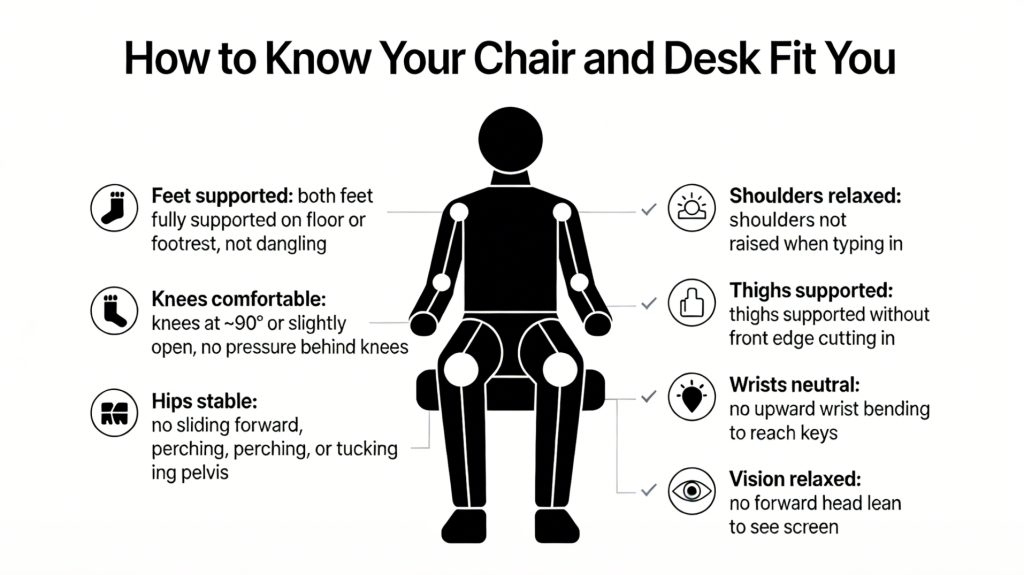
One-minute checklist to confirm proper office chair height
Sit normally, hands on the keyboard, and answer yes or no.
- Feet supported: both feet are fully supported on the floor or a footrest, not dangling.
- Knees comfortable: knees are roughly at 90 degrees or slightly more open, with no pressure behind the knees.
- Hips stable: you do not feel like you are sliding forward, perching, or tucking your pelvis under to reach the desk.
- Thighs supported: thighs feel supported without the front edge cutting in.
- Shoulders relaxed: shoulders are not raised when typing.
- Wrists neutral: you are not bending wrists upward to reach the keys.
- Vision relaxed: you are not leaning your head forward to see the screen.
If you get two or more “no” answers, do not micro-adjust. Reset the chair height first, then re-check.
What to do if your chair cannot reach the proper height
If the chair is too high at its lowest setting
Common signs:
- Feet cannot fully reach the floor
- Pressure behind the knees
- You feel unstable or perched
Fix options:
- Use a footrest that supports the whole foot
- Consider a chair with a lower minimum seat height
- Avoid sitting on the front edge to “cheat” height; it usually increases back strain
If the chair is too low at its highest setting
Common signs:
- Knees are too high relative to hips
- Hips feel cramped
- You cannot get close to the desk without shoulder tension
Fix options:
- Consider a chair with a higher maximum seat height
- If you must use the chair, raise the seat only if you can still keep feet supported, or use a stable foot platform
If the desk is the real constraint
If you keep raising or lowering the chair and nothing feels right, the desk height is likely forcing compensation. In that case:
- Raise the chair to match the desk for arm comfort
- Then use a footrest to restore leg support
- If possible, bring the keyboard and mouse closer and lower so shoulders stay down
Conclusion
Proper office chair height is not about copying a chart. It is about setting your body up so you can work for hours without strain or compensation.
Start with the floor. Get your feet fully supported and your lower body stable. Then match the desk and screen to that posture. When the height is right, comfort stops being something you chase and becomes your default. An ergonomic office chair with proper height adjustment helps you maintain this setup.