Understanding desk chair dimensions helps office buyers, facility managers and furniture distributors select seating that fits a wider range of users and workspace layouts. Seat height, seat depth, seat width, backrest height, armrest spacing and base width all affect whether a chair can be used comfortably and efficiently.
This guide explains common office chair measurement ranges, how to measure a chair correctly and how to convert those measurements into practical specifications for commercial projects. For step-by-step personal adjustment instructions after the chair has been installed, see our guide to setting the proper office chair height.
What Desk Chair Dimensions Include
Office chair dimensions should describe the usable seating area and the full adjustment range, not only the overall size of the chair. The main measurements include:
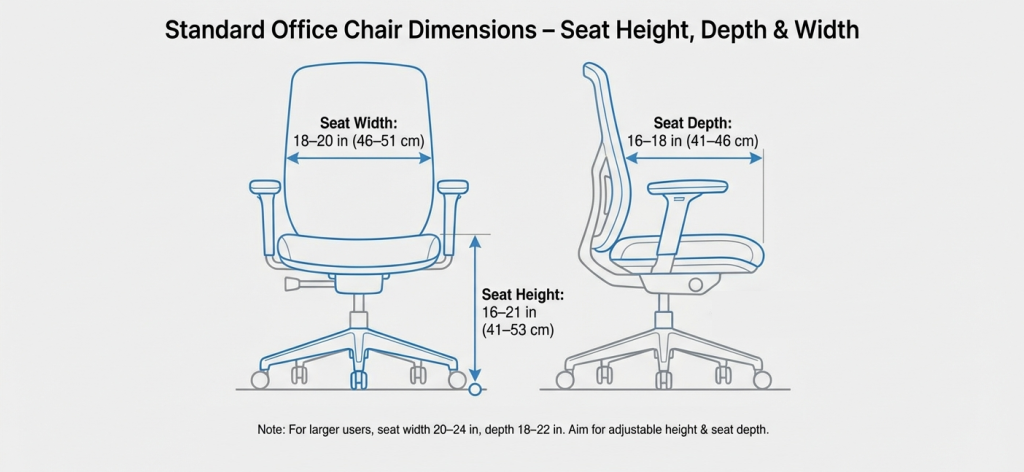
- Seat height: The vertical distance from the floor to the top of the usable seat surface.
- Seat depth: The distance from the front edge of the seat to the point where the seat meets the backrest.
- Seat width: The usable side-to-side width of the sitting surface.
- Backrest height: The distance from the seat surface to the top of the backrest.
- Armrest height: The vertical distance from the seat surface to the top of the arm pad.
- Armrest spacing: The usable distance between the inner edges of the armrests.
- Lumbar support position: The height and depth range of the lumbar support relative to the seat.
- Base width or footprint: The widest distance across the five-star base and castors.
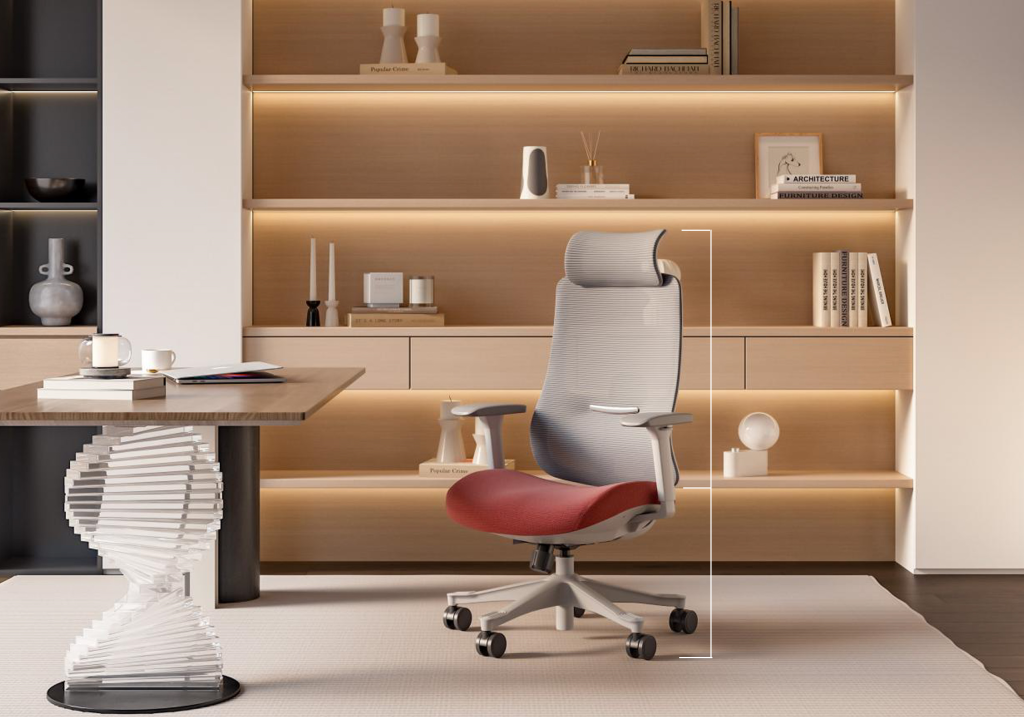
- Overall chair height: The distance from the floor to the top of the backrest or headrest.
For adjustable chairs, the minimum and maximum values should be recorded. A single fixed measurement does not show whether the chair can accommodate different users.
Why Office Chair Dimensions Matter for Commercial Buyers
Office chair size is not simply a design detail. Incorrect dimensions can create pressure behind the knees, insufficient thigh support, poor desk alignment or limited movement between workstations.
For a single user, a poor fit may cause discomfort. Across a larger office project, the same issue can lead to inconsistent workstation setups, more product complaints and difficulty standardizing furniture across different locations.
- User coverage: The adjustment range should accommodate the intended employee population rather than one average body size.
- Workspace planning: Chair footprints must fit between desks, partitions and circulation routes.
- Shared workstations: Hot-desking environments require broader adjustment ranges than individually assigned seating.
- Procurement consistency: Defined measurements make supplier quotations and model comparisons easier to evaluate.
- Special user needs: Petite, tall and larger-framed users may require different seat heights, depths and widths.
Common Office Chair Dimensions
The following ranges are common starting points for general office task chairs. They should not be treated as universal requirements because the correct specification depends on the intended users, chair construction and application.
| Dimension | Common Range | Why It Matters |
|---|---|---|
| Adjustable seat height | 16–21 in 41–53 cm | Helps users support their feet and align their knees, hips and desk position. |
| Seat depth | 16–18 in 41–46 cm | Supports the thighs without pressing into the back of the knees. |
| Seat width | 18–20 in 46–51 cm | Provides sufficient sitting space while keeping armrests within reach. |
| Mid-back backrest height | 12–22 in 30–56 cm above seat | Supports the lower and middle back while maintaining a compact profile. |
| High-back backrest height | 22–32 in 56–81 cm above seat | Provides additional upper-back and, in some models, head support. |
| Armrest height | 7–10 in 18–25 cm above seat | Helps support the forearms without forcing the shoulders upward. |
| Base width | 24–28 in 61–71 cm | Affects stability, movement and the floor area required around each desk. |
Executive and big-and-tall chairs may use wider and deeper seats. Petite chairs may require a lower minimum seat height and a shallower seat pan. Drafting chairs and chairs for raised workstations require a substantially higher seat-height range and a stable footring.
How to Measure an Office Chair Correctly
Consistent measurement methods are essential when comparing products from different suppliers. Measure the usable surfaces rather than decorative edges or external frame dimensions.
Seat Height
- Place the chair on a level surface.
- Measure vertically from the floor to the highest usable point of the seat surface.
- For an adjustable chair, record both the minimum and maximum seat height.
- Confirm whether the published measurement includes or excludes seat compression.
Seat Depth
- Measure from the front edge of the usable seat to the point where it meets the backrest.
- If the chair includes a seat slider, record the minimum and maximum effective depth.
- Do not include a gap between the seat and backrest unless it forms part of the usable sitting area.
Seat Width
- Measure the flat, usable sitting width from side to side.
- Exclude decorative flares or curved edges that do not provide stable support.
- Record the clear width between fixed armrests where applicable.
Backrest and Lumbar Support
- Measure backrest height vertically from the top of the seat surface.
- Record backrest width at the widest usable point.
- If the lumbar support is adjustable, record its vertical and depth adjustment range.
Armrests
- Measure armrest height from the seat surface to the top of the arm pad.
- Measure spacing between the inner edges of the two arm pads.
- Record the minimum and maximum positions for height-, width- or depth-adjustable armrests.
- Confirm whether the armrests can fit beneath the intended desks.
Base and Overall Footprint
- Measure across the widest points of the base and castors.
- Also check the space required when the chair swivels or reclines.
- For compact layouts, verify that adjacent chairs can move without repeated collisions.
Matching Seat Height to Users and Desks
Seat-height charts can provide an initial reference, but body height alone does not determine the correct setting. Two people of the same height may have different leg lengths, footwear and workstation requirements.
| Approximate User Height | Useful Seat-Height Starting Range |
|---|---|
| 4′10″–5′2″ 147–158 cm | 15–17 in 38–43 cm |
| 5′3″–5′7″ 160–170 cm | 16–18 in 41–46 cm |
| 5′8″–6′2″ 173–188 cm | 17–21 in 43–53 cm |
| 6′3″ and above 190 cm and above | 18 in and above 46 cm and above, depending on leg length |
A suitable seated position generally allows the feet to remain supported, the thighs to rest without excessive pressure and the front of the seat to clear the back of the knees. The desk or keyboard position should then allow the shoulders to remain relaxed.
For a typical fixed desk around 29–30 in (73–76 cm) high, an adjustable seat-height range of approximately 16–21 in can accommodate many users. However, a fixed desk may still be too high for shorter users. In that situation, the chair may need to be raised for arm alignment while a footrest provides lower-leg support.
For exact adjustment instructions, including what to do when the desk is fixed or the chair cannot move low enough, read our proper office chair height guide.
Backrest, Lumbar Support and Armrest Dimensions
Seat dimensions alone do not guarantee a suitable fit. Backrest and armrest measurements determine whether the upper body can remain supported without forcing the shoulders, elbows or spine into an awkward position.
Mid-Back and High-Back Chairs
Mid-back office chairs generally support the lumbar and middle-back regions while maintaining a smaller overall footprint. High-back chairs extend further upward and may include a headrest for users who recline or require additional upper-body support.
Backrest height should be evaluated together with lumbar-support position. A taller backrest does not automatically provide better support if the lumbar curve does not align with the intended users.
Armrest Height and Spacing
Armrests should support the forearms without raising the shoulders or pushing the elbows too far away from the body. Adjustable armrests are particularly useful in shared workstations.
The actual adjustment dimensions are more useful than labels such as 2D, 3D or 4D. Procurement specifications should state which movements are required, such as:
- Height adjustment
- Forward-and-backward sliding
- Inward and outward rotation
- Lateral width adjustment
Specifying Chair Dimensions for an Office Project
Terms such as “ergonomic chair” or “large office chair” are too broad for a commercial tender. A dimension-based specification makes quotations easier to compare and reduces ambiguity during sample approval and production.
Example Dimension Requirements
- Seat height: Adjustable approximately 16–21 in, or a project-specific range.
- Seat width: Minimum usable width of 18 in for general task seating.
- Seat depth: Approximately 16–18 in, preferably with a seat slider for shared workstations.
- Backrest: Defined height and width, with lumbar support positioned for the intended user range.
- Armrests: Minimum and maximum height, clear internal spacing and required adjustment directions.
- Base width: Maximum allowable footprint for the planned workstation layout.
- Overall size: Maximum chair height and depth when upright and fully reclined.
The specification can also include:
- Recommended user-weight range
- Applicable complete-chair and component test standards
- Material specifications
- Warranty coverage
- Replacement-part availability
- Sample approval requirements
Dimensions for Different Users and Applications
Petite Users
Shorter users generally benefit from a lower minimum seat height, a shallower seat and armrests that can move sufficiently inward and downward.
- Minimum seat height around 15–17 in where required
- Reduced or adjustable seat depth
- Narrower armrest spacing
- Footrest compatibility when desks cannot be lowered
Tall and Larger-Framed Users
Taller or larger users may require a higher seat range, greater depth, a wider seat and a structure rated for the intended user-weight range.
- Seat widths up to approximately 22–24 in where needed
- Seat depths around 18–22 in, preferably adjustable
- Higher maximum seat position
- Wider armrest spacing
- Reinforced bases, mechanisms and gas lifts
Projects that include a broad workforce may benefit from combining a general task-chair model with a smaller number of dedicated big-and-tall office chairs.
Conference and Visitor Seating
Conference and visitor chairs are normally used for shorter periods and may require fewer adjustments. Their dimensions should still support the intended users and allow chairs to fit beneath tables or within reception layouts.
- Seat width commonly around 18–22 in
- Seat depth commonly around 16–18 in
- Appropriate table clearance
- Sufficient aisle and circulation space
Drafting and Raised Workstations
A standard task chair is not suitable for a counter-height or drafting workstation. These applications normally require an extended gas lift, a higher seat range and a stable footring. See the high-base drafting chair configuration for an example.
Desk Chair Dimension Checklist
- Does the seat-height range cover the intended users?
- Can the user sit against the backrest without pressure behind the knees?
- Is the usable seat width suitable for the target user population?
- Can the lumbar support align with different users?
- Can the armrests support the forearms without raising the shoulders?
- Will the armrests fit beneath the planned desks?
- Does the base fit within the workstation and circulation space?
- Are minimum and maximum adjustment values shown on the supplier’s specification sheet?
- Do the approved sample and production model use the same dimensions?
- Are special chairs available for users outside the general adjustment range?
Desk Chair Dimension FAQs
What is a standard office chair seat height?
Many adjustable office chairs provide a seat-height range of approximately 16–21 in (41–53 cm). The correct setting depends on the user’s leg length, footwear, desk height and access to a footrest.
What seat width fits most office users?
A usable seat width of approximately 18–20 in fits many adults in general office environments. Projects serving a broader user population may also require wider or specialist models.
How deep should an office chair seat be?
A common seat-depth range is approximately 16–18 in. When the user sits against the backrest, there should be clearance between the front edge of the seat and the back of the knees.
Can one chair size fit an entire office?
No single chair will provide an ideal fit for every user. A model with broad seat-height, seat-depth and armrest adjustment can accommodate many employees, while specialist chairs may still be required for users at the ends of the size range.
Do conference chairs need the same dimensions as task chairs?
Not necessarily. Conference chairs are usually used for shorter sessions and may include fewer adjustments. Their seat width, depth, backrest and table clearance should still be suitable for the intended application.
Should buyers request a dimensioned drawing?
Yes. A dimensioned drawing or specification sheet makes it easier to compare suppliers, verify the approved sample and confirm that the production model matches the agreed measurements.
Conclusion
Desk chair dimensions provide the foundation for consistent and usable office seating. Buyers should evaluate the complete adjustment range rather than relying on general descriptions such as ergonomic, standard or executive.
Define the required seat height, depth, width, backrest, armrest and footprint dimensions before requesting quotations. Explore VASEAT’s bulk office chair range or contact our team to discuss dimensions, user coverage and commercial project specifications.