
If your back feels tight after an hour, or you keep leaning forward without noticing, the problem is rarely bad posture. Most people are fighting a setup that forces the body into one fixed position. The best way to sit on an office chair is to treat sitting as an adjustable system: seat height, seat depth, back support, arm support, and screen position all work together.
This guide shows you a practical, repeatable method you can use on almost any office chair, whether it has basic adjustments or a full ergonomic control set.
Why the best way to sit is not sitting perfectly still
A “perfect” pose that you hold for hours is not ergonomic. Your body needs small changes in angle and pressure to stay comfortable. When you stay still, muscles fatigue, circulation slows, and you start compensating with slouching, forward head posture, or shoulder tension.
A better goal is stable support plus regular micro-movements: a chair setup that keeps your pelvis supported, your spine neutral, and your shoulders relaxed, while making it easy to shift position every 30–45 minutes.
The sitting angle that reduces strain during desk work
For most people, the most comfortable long-work posture is not a strict 90-degree bend at the hips.
Aim for:
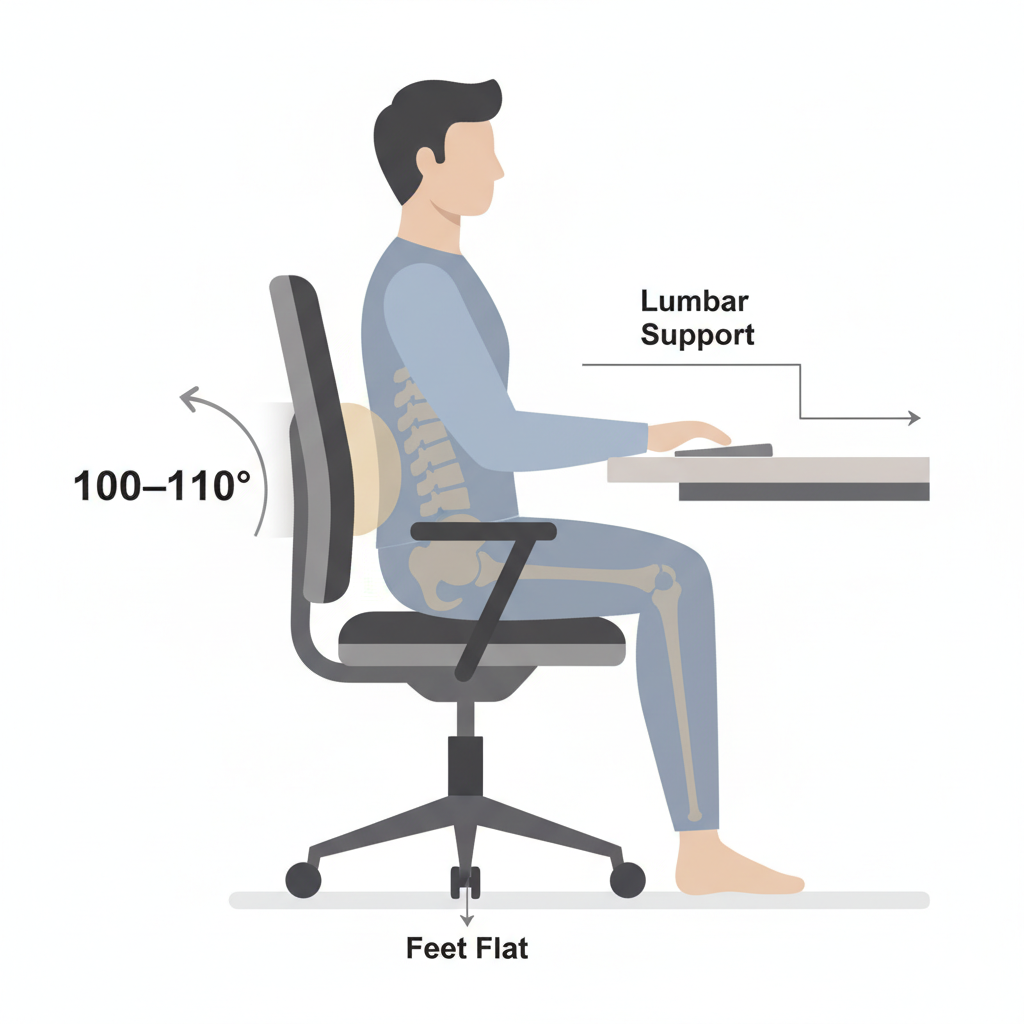
- A hip angle around 100–110 degrees
- A gentle recline that still lets you type and use a mouse comfortably
- A supported lower back so your pelvis does not roll backward
This angle helps your backrest carry some of your upper-body weight, reducing constant muscle work in your lower back and neck.
Step-by-step how to sit correctly on any office chair
Follow these steps in order. Each step makes the next one easier.
Step 1 Set seat height so your feet anchor your posture
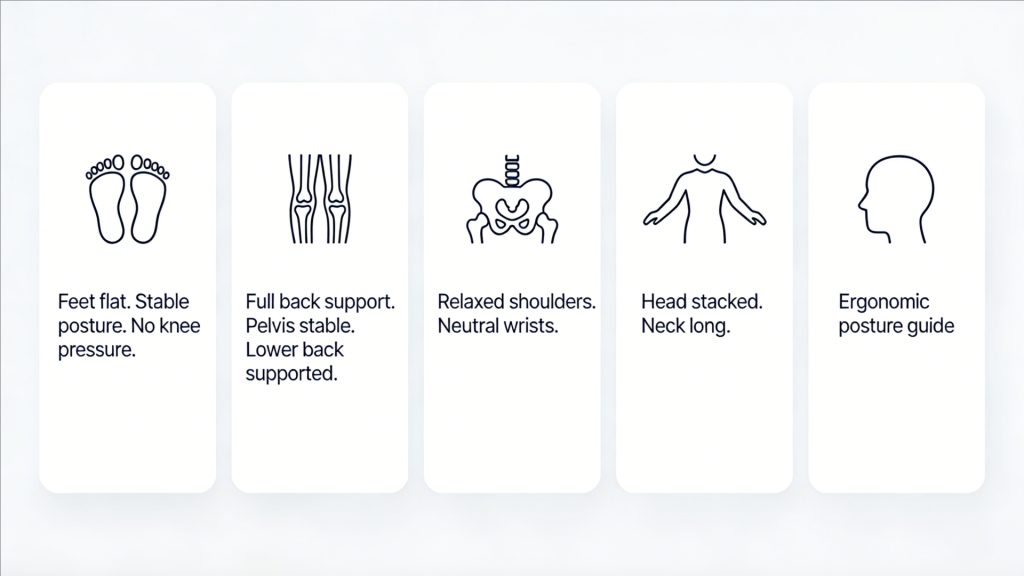
Goal: Feet flat, weight evenly distributed, no pressure points under the thighs.
Do this:
- Sit all the way back in the chair.
- Place both feet flat on the floor.
- Adjust height until your knees are level with your hips or slightly lower.
Quick self-check:
- If your feet cannot stay flat, the seat is too high.
- If your knees are much higher than your hips, the seat is too low.
- If you feel the front edge digging into your thighs, the seat may be too high or too deep.
If your desk is fixed and forces the chair too high, use a footrest or a stable platform so your feet still rest flat.
Step 2 Set seat depth so you can use the backrest without pressure behind the knees
Goal: Support your thighs without cutting off circulation behind your knees.
Do this:
- Sit back so your lower back meets the backrest.
- Check the gap between the front edge of the seat and the back of your knees.
- Aim for about 2–3 finger widths of space.
Common problems:
- Seat too deep: you slide forward, lose back support, and slouch.
- Seat too shallow: you feel perched and your thighs lack support.
If your chair has no seat depth adjustment and feels too deep, add a firm lumbar cushion so you can sit back while keeping clearance behind the knees.
Step 3 Set backrest and lumbar support to stabilize your pelvis
Goal: Lower back supported, pelvis stable, no forced arching.
Do this:
- Sit back and let the backrest take some weight.
- Position lumbar support so it fits into the natural curve of your lower back.
- The support should feel present, not aggressive.
Self-check signs you got it right:
- You can breathe easily.
- Your chest is open without forcing your ribs up.
- You can relax your stomach and still feel supported.
If your chair has no lumbar support:
- Use a small rolled towel or a thin cushion placed at the belt line.
- Keep it small. Over-padding can push you too far forward.
Step 4 Set armrests so shoulders stay down and wrists stay neutral
Goal: Arms supported lightly, shoulders relaxed, elbows near your sides.
Do this:
- Drop your shoulders fully.
- Bend elbows around 90 degrees.
- Raise armrests until they just meet your forearms.
Avoid these mistakes:
- Armrests too high: shoulders shrug up, neck tightens.
- Armrests too low: you lean onto the desk or hold your arms up.
- Armrests too wide: elbows flare out and shoulders rotate forward.
If armrests block you from sitting close to the desk, lower them or move them back, then bring the chair closer so you do not reach forward.
Step 5 Keep your head stacked over your torso, not pushed forward
Goal: Ears roughly over shoulders, chin level, eyes looking slightly downward.
Do this:
- Sit tall without forcing your chest up.
- Imagine the back of your head sliding gently upward.
- Keep chin slightly tucked so your neck stays long.
A useful cue:
If you can feel your neck working to hold your head up, your screen is likely too low or too far away.
Desk and monitor setup that supports the best way to sit
You do not need a perfect workstation, but these two adjustments prevent the most common posture breakdowns.
Monitor height and distance
Aim for:
- The top of the screen near eye level
- Your eyes looking slightly down to the center of the screen
- Screen at about an arm’s length away
If you use a laptop, consider raising it and using an external keyboard and mouse. Laptops encourage forward head posture because the screen sits low.
Keyboard and mouse position
Aim for:
- Elbows close to your sides
- Forearms roughly parallel to the floor
- Wrists straight and relaxed
If you have to reach forward to type, you will gradually lean forward and lose back support. Pull the keyboard closer and bring the chair closer to the desk.
Signs you are sitting wrong even if it feels fine at first
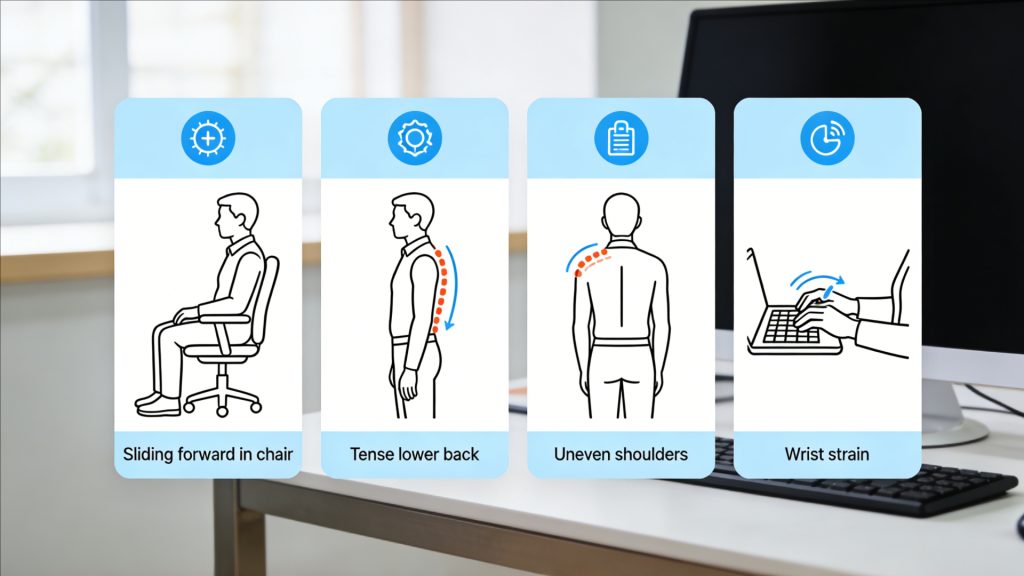
Bad setups often feel okay for the first 10–20 minutes. These signals show the posture is not sustainable:
- You keep sliding forward on the seat.
- Your lower back tightens after 30–60 minutes.
- One shoulder feels higher than the other.
- You feel pressure or numbness in the thighs.
- Your wrists feel tense or bent while typing.
- You feel the need to crane your neck toward the screen.
When you notice any of these, do not “try harder” to sit straight. Re-check seat height, seat depth, and how close you are to the desk.
Dynamic sitting habits that keep you comfortable all day
Even with a great chair setup, your body needs movement.
Use this simple routine:
- Every 30–45 minutes, change something small
Recline slightly, sit more upright, or shift your pelvis back into support. - Every 60–90 minutes, stand for 1–2 minutes
Walk to refill water, do a quick stretch, or reset your posture.
Think of your chair as a support tool that makes movement easy, not a device that locks you into one “perfect” position.
FAQs
What is the best sitting angle for office work?
For most people, a slight recline works best. Aim for a hip angle around 100–110 degrees so the backrest carries some upper-body load while you can still type comfortably.
Should my back touch the chair all the time?
Most of the time, yes. Sitting back helps your backrest and lumbar support do their job. You can still shift between upright and slightly reclined positions.
Is sitting cross-legged on an office chair bad?
Occasionally is fine, but doing it often can tilt your pelvis, twist your spine, and create uneven hip pressure. If you notice one-sided tightness, return to feet-flat posture more consistently.
How long should I sit before standing up?
A simple rule is to change position every 30–45 minutes and stand briefly every 60–90 minutes. Even 1–2 minutes helps.
What if my chair has limited adjustments?
Prioritize seat height and seat depth first. If back support is lacking, add a small lumbar cushion at the belt line and ensure you sit close to the desk to avoid leaning forward.
Conclusion
The best way to sit on an office chair is to build support from the ground up. Start with feet flat and stable, then set seat height and seat depth so you can sit all the way back without pressure behind the knees. Add lower-back support that stabilizes your pelvis, adjust armrests so your shoulders can relax, and keep your screen close enough that your head stays stacked over your torso. When your setup is right, comfort feels effortless because your body is not constantly fighting gravity.
The second part is movement. No posture is “correct” if you hold it for hours without change. Make small shifts every 30–45 minutes and stand briefly every 60–90 minutes. When you combine a supportive setup with regular micro-movements, you get the real outcome people want: fewer aches, less fatigue, and a sitting position you can maintain through a full workday.